Press-On Nails for a Laptop Keyboard: Reduce Key Collisions and Lifting
Adapt press-on length and technique to laptop keyboards, then diagnose whether key collisions, fit, or one repeat-offender finger is causing trouble.
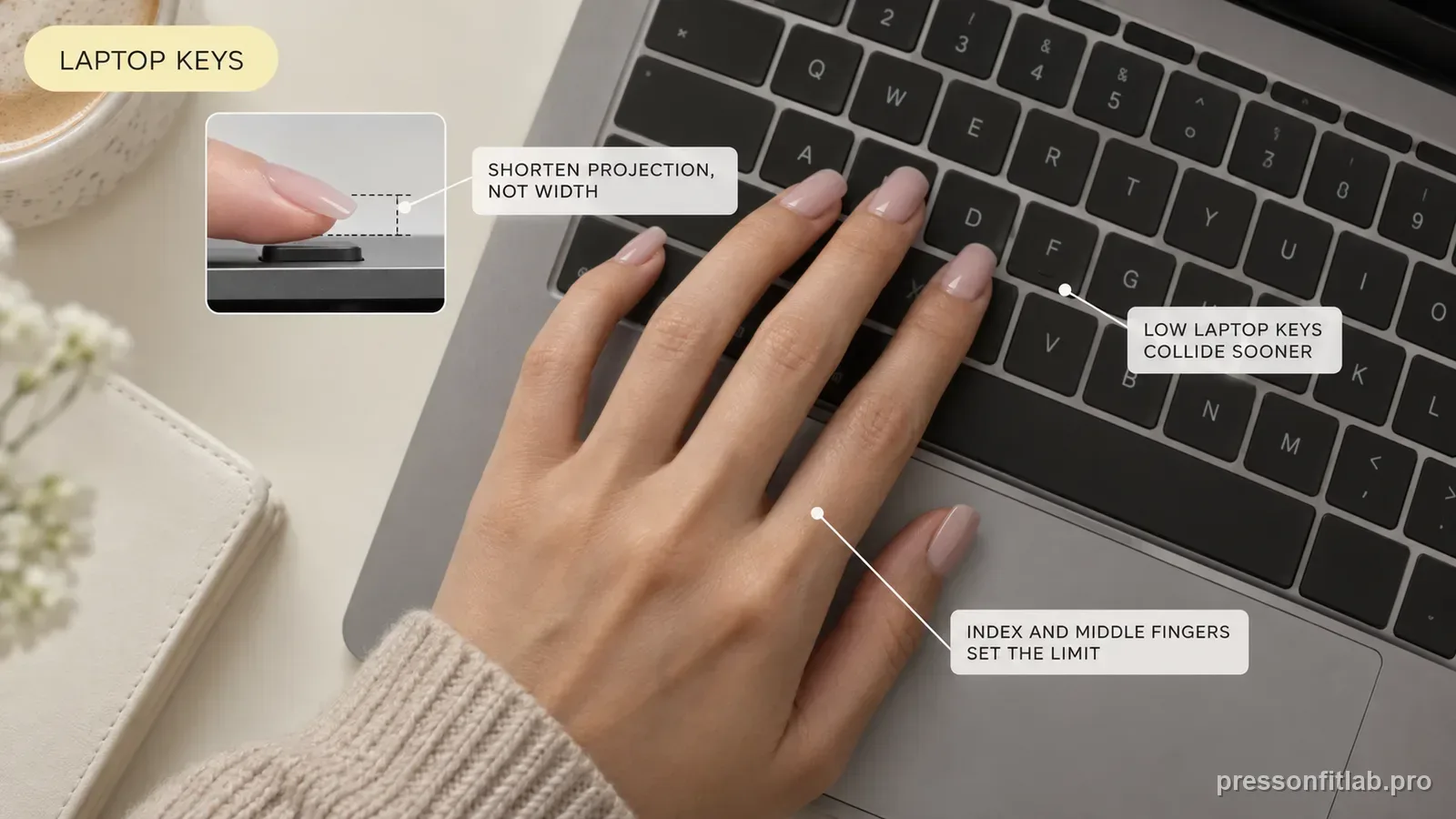
Laptop keyboards can be less forgiving of long press-ons because the keys are low and close together. Start with short or lower-projection tips, keep the nail width/curve fit unchanged, and test whether your finger pads can reach keys without the free edge striking first. If one or two nails loosen, test a shorter molded length or refit those fingers rather than assuming every nail needs stronger glue.
Check these first
- ✓ How low are the keys and how little space is there between rows?
- ✓ Which nails collide first during normal typing—not a staged test?
- ✓ Can you press keys with the finger pads while keeping wrists neutral?
- ✓ Are repeated misses caused by nail length, or is a nail already rocking and unstable?
Why laptops feel different from raised keyboards
Many laptop keyboards have shallow travel and low keycaps. A longer nail approaching at a steep angle can hit the key surface or the row above before the fingertip lands where your muscle memory expects. This can make a set feel “too long” on a laptop even when it is comfortable on a desktop keyboard.
Treat the laptop as its own use case. If your work happens there eight hours a day, test nail length there before deciding what counts as a daily-wear set.
Shorten projection, not width
When typing feels crowded, the instinct can be to choose a smaller nail size. That is the wrong dimension if the sidewalls already fit correctly. A narrower tip may expose the natural nail and create side lifting while doing little to solve the collision at the free edge.
Keep the correct width and curve, then choose a shorter version of the shape or a lower-projection silhouette. Length is the variable that changes how far the press-on reaches into the keyboard.
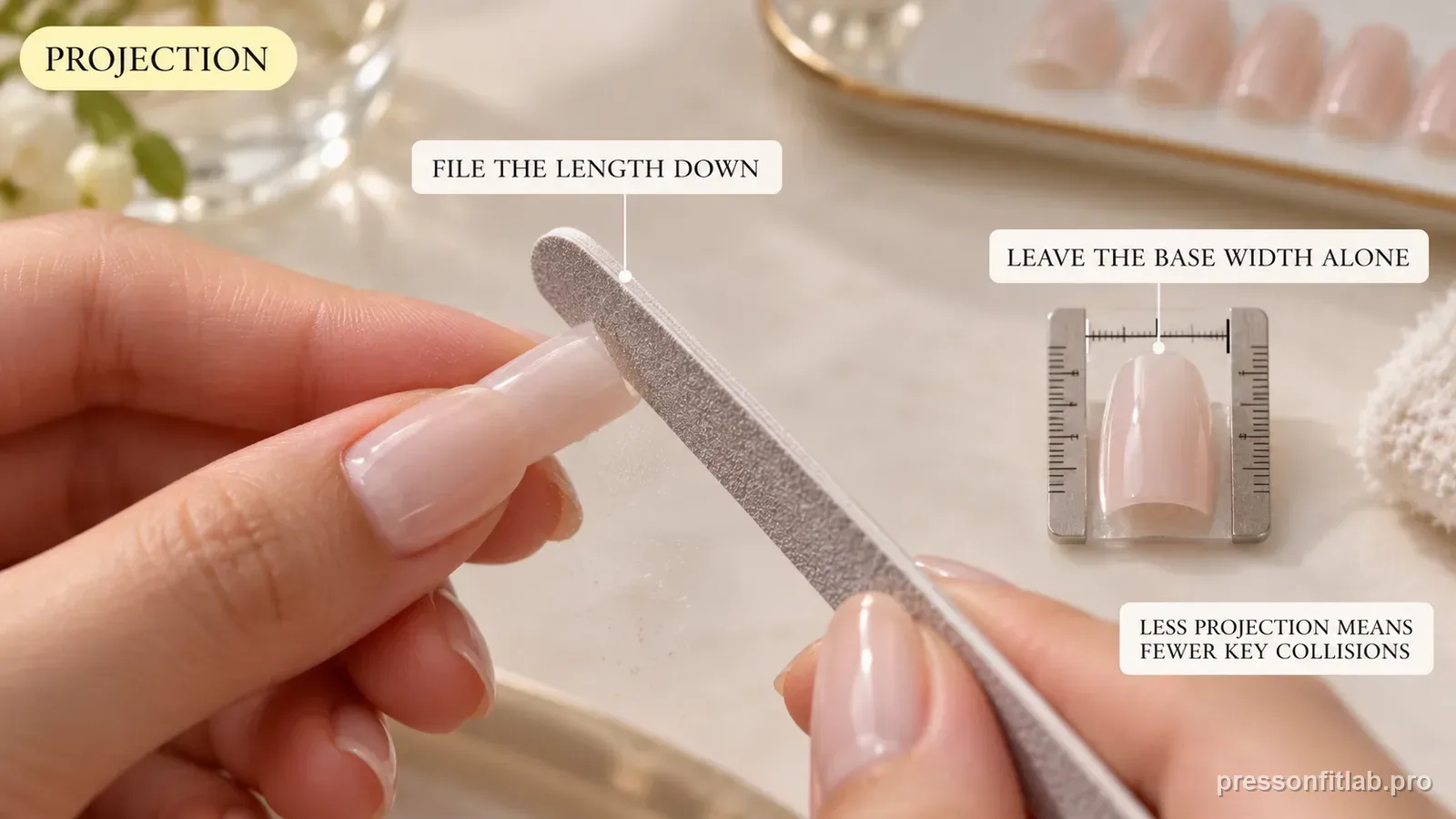
Use pad contact without forcing wrist posture
Some long-nail users adapt by typing with more of the finger pads or slightly changing finger angle. That can work, but the adjustment should remain comfortable. If you must hold your wrists high, twist fingers sideways, or tense your hands for an entire workday, the length is costing too much.
A lower-profile set should let you return closer to your normal hand position. Comfort is a performance metric here, not an optional extra.
The index and middle fingers often define the limit
Many touch typists use index and middle fingers across multiple rows, so those nails may collide more often than some others. Rather than altering all ten, try a short spare on the repeat offenders while leaving the rest of the design medium.
This approach is especially helpful with reusable sets. Keep those alternative pieces labeled in the storage case so you can switch to a “laptop configuration” during heavy work weeks.
Distinguish collision from adhesive failure
A nail can pop because it keeps striking keys, but it can also pop because it was poorly fitted from the start. Before blaming the laptop, dry-fit the problem finger and check sidewalls and curve. If the nail rocks while your hand is resting, the keyboard is not the root cause.
If the fit is solid and failure appears only after long typing sessions, test a shorter molded length or adjust technique first. Stronger glue should not be the default fix for repeated mechanical leverage.
Diagnostic table
| What you see | What it suggests | Next check |
|---|---|---|
| Tips strike upper key row | Excess projection for low-profile board | Try shorter tip with same width |
| Only index/middle loosen after workday | Repetitive leverage on those fingers | Test a shorter molded length or refit only repeat offenders |
| Nail rocks even before typing | Fit problem | Fix width/curve before keyboard testing |
| Desktop is comfortable, laptop is not | Keyboard geometry difference | Maintain separate laptop length profile |
| Typing causes hand tension | Technique/length mismatch | Return to neutral posture with shorter nails |
A controlled test plan
- 1
Dry-fit the planned set and lightly simulate normal key reach without striking keys with unsecured tips; then confirm the chosen length during a normal applied work session.
- 2
Use a short baseline for one workday and note collisions by finger.
- 3
If comfortable, test medium length on a low-stakes day while keeping width and adhesive unchanged.
- 4
Use shorter molded tips on only the fingers that repeatedly collide and compare the next session.
- 5
Save the winning per-finger configuration with your measurement profile.
What not to do
- Sizing nails narrower to solve a length collision.
- Practicing through hand or wrist pain to “get used to” long nails.
- Using a loose press-on as a keyboard test instead of fixing the fit first.
- Assuming a mechanical keyboard and a thin laptop keyboard require the same nail configuration.
Worked troubleshooting example
Example: you use medium square press-ons at home on a raised keyboard with no issue. At work, the same set hits adjacent keys on a thin laptop, especially on both index fingers.
You confirm the nails fit sidewall-to-sidewall and do not rock, then swap only the index nails to a short squoval version in matching color. The work keyboard becomes much easier while the rest of the manicure remains unchanged.
That points to device-specific free-edge projection, not a weak adhesive. You store the two short index pieces as your laptop configuration for the next wear.
Field notes
Laptop typing is a strong argument for keeping spare sizes and lengths organized. The ideal set can change with the device you expect to use most that week.
If your job restricts keyboard accessories, the variables you still control are nail length, shape projection, finger-specific substitutions, and technique. Those are enough to build a workable profile without relying on a special keyboard cover.
Frequently asked questions
What press-on length is easiest for a laptop keyboard?
Short is the safest starting point. Medium may work depending on key height and technique, but test your actual laptop rather than relying on a generic label.
Why can I type on a desktop keyboard but not my laptop with press-ons?
Low-profile laptop keys give long nails less clearance and can change the angle at which your finger pads reach the keys.
Can I wear different nail lengths on my index fingers?
Yes. A slightly shorter repeat-offender finger can improve function without changing the whole set.
Sources checked
Sources below are page-specific. We prioritize manufacturer directions for product-specific steps and use medical or dermatology guidance when a safety question requires it. Always follow the instructions for the exact adhesive or set you own.